
Invoice processing combines two different jobs. Reading a document can involve inconsistent layouts, tables, and descriptions. Matching the extracted data against company rules is often deterministic. Keeping those jobs separate makes the workflow easier to test and keeps financial authority with the right person.
Build the control path before adding extraction
First map the documents and approval route already in use. Identify where invoices arrive, which purchase order or change authorizes the work, what receipt or progress evidence applies, who checks project coding, and which role can approve or dispute the charge. A model cannot fix an unclear authority path.
Use ordinary rules for clear conditions: duplicate invoice identifiers, arithmetic checks, required vendor fields, purchase-order existence, approved tolerance rules, and known coding formats. Keep tolerance values and approval rules in the system controlled by the business. Do not bury them in a prompt or let a model improvise the threshold.
Use an extraction service or model to read variable layouts and return candidate fields with source locations. AWS Textract’s invoice and receipt documentation describes extracted summary fields, line items, page locations, and confidence values. Its best-practice guidance says to account for confidence and choose thresholds based on the sensitivity of the use case. These product features support extraction and review prioritization. A confidence score is not proof that a value is correct. Amazon Textract: Analyzing invoices and receipts · Amazon Textract best practices · AnalyzeExpense API
Keep exceptions distinct from approval
An exception should say what did not match, what evidence was compared, and who owns the next action. “Quantity mismatch” is more useful than a generic red warning if it links the invoice line, purchase-order line, and receiving record. “Receipt missing” should not be converted into “not delivered.” The evidence is incomplete; a responsible person needs to investigate.
Route different exceptions to the right people. Finance may resolve coding or duplicate questions. A project manager may verify progress or delivery. Procurement may clarify a supplier’s line description. A disputed change may need the role responsible for contract administration. The exact routing should follow the company’s approved policy.
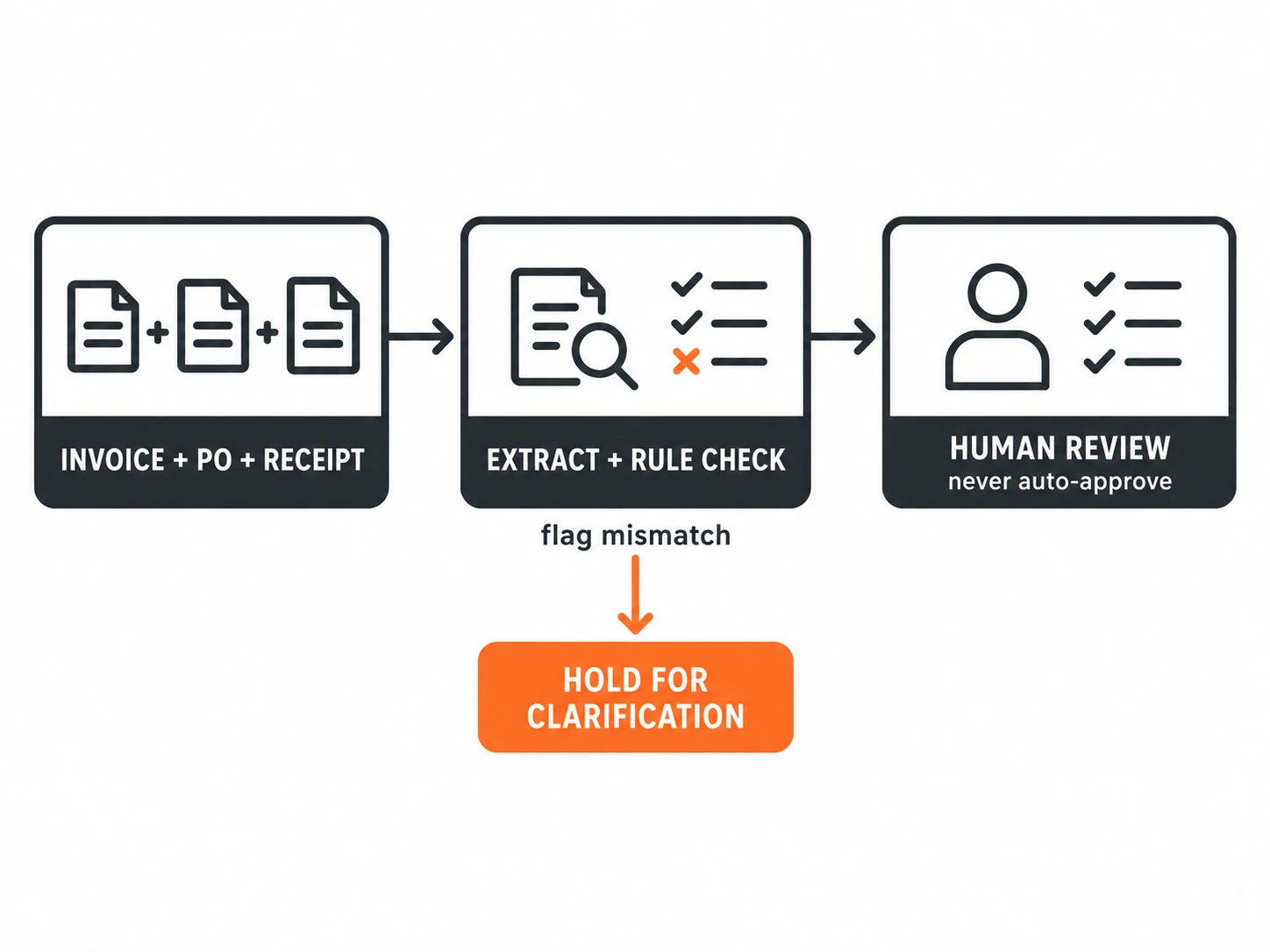
The model can extract, classify, and draft a short explanation. Deterministic logic can compare fields and apply explicit policy. A named human reviews ambiguity, context, and the final approval decision. Payment release remains within the company’s existing financial authorization process. Do not add a button that turns “matched” into “approved” unless an authorized policy and system owner explicitly permits that control.
Worked example: partial receipt, not automatic rejection
Hypothetical example: An invoice lists a vendor, invoice number, total, and a line for a stated quantity of material. The authorized purchase order lists a different quantity, and the receipt record confirms only a partial delivery. The extraction step returns the invoice fields with page locations. A deterministic check compares the invoice line with the PO and receipt, then flags the quantity difference and partial receipt.
The project reviewer opens the cited pages and confirms that the records refer to the same order and delivery. They may ask the supplier for clarification, hold the invoice, or follow the organization’s approved process for a partial receipt. The system does not infer that the undelivered portion should be paid or rejected. It gives the reviewer a specific exception and the evidence needed to investigate it.
The same principle applies when a document is blurry or a line item cannot be matched confidently. Mark the field for manual entry. Do not use a low-confidence value to clear a payment check.
Limit data and preserve a review trail
Invoices can contain vendor and project information that should only go to approved systems. Before using a new processor, confirm the company’s data-handling requirements, access configuration, retention terms, and any contractual limits with the relevant owner. Send only what the approved workflow requires. This article does not make a general promise about any vendor’s retention or privacy settings.
Record the original invoice, extracted values, rule results, exceptions, reviewer actions, and final disposition in the approved financial system. Keep corrections attributable. If a reviewer edits a value, the record should distinguish the extracted suggestion from the verified value. That distinction helps audit the process and find recurring causes such as poor scans or inconsistent vendor descriptions.
Pilot with a matched human review
Run the assisted workflow beside the current process before relying on it. Compare the same invoice set through both paths, with a qualified reviewer checking the underlying documents. Track field corrections, mismatches correctly surfaced, exceptions missed, false alarms, manual-review rate, and time from receipt to verified disposition. Break down errors by field and document type instead of relying on one aggregate score.
Agree on acceptance criteria and stop conditions before the pilot begins. If the model frequently misreads quantities or tax, keep those fields manual or add a stronger deterministic check. If simple required-field rules resolve most of the problem, use rules and skip AI for that step. The pilot should help decide which task benefits from interpretation, not prove that automation is always better.
For construction firms, Blackwing’s construction operations page describes connected processes across purchasing and payments. A 30-minute Operations Review is a practical next step when invoice exceptions, missing records, or unclear approval handoffs are creating avoidable delay.
Frequently asked questions
Can AI approve or pay a construction invoice?
This workflow does not give the model approval or payment authority. It extracts information and prepares exceptions. An authorized finance or project role makes the decision using the company’s existing controls.
What should happen when invoice and receipt quantities differ?
Flag the difference with links to the invoice, purchase order, and receipt evidence. Assign it to the right reviewer. Do not assume the mismatch proves delivery or non-delivery.
Is an extraction confidence score the same as accuracy?
No. It can help prioritize review, but it does not guarantee that the extracted value is correct. The reviewer should check the source for sensitive fields and exceptions.
How do I measure an invoice-processing pilot?
Compare assisted and current workflows on the same type of invoices. Track corrections, missed and correctly flagged exceptions, false alarms, review rates, and time to verified disposition.