
A software demonstration can make purchasing, inventory, sales, and finance look connected. Your business still has to decide who owns the records, which approvals apply, and what happens when the normal sequence breaks.
If those decisions are unresolved, the implementation team will fill the gaps with assumptions. Some will be reasonable. Others will become expensive workarounds.
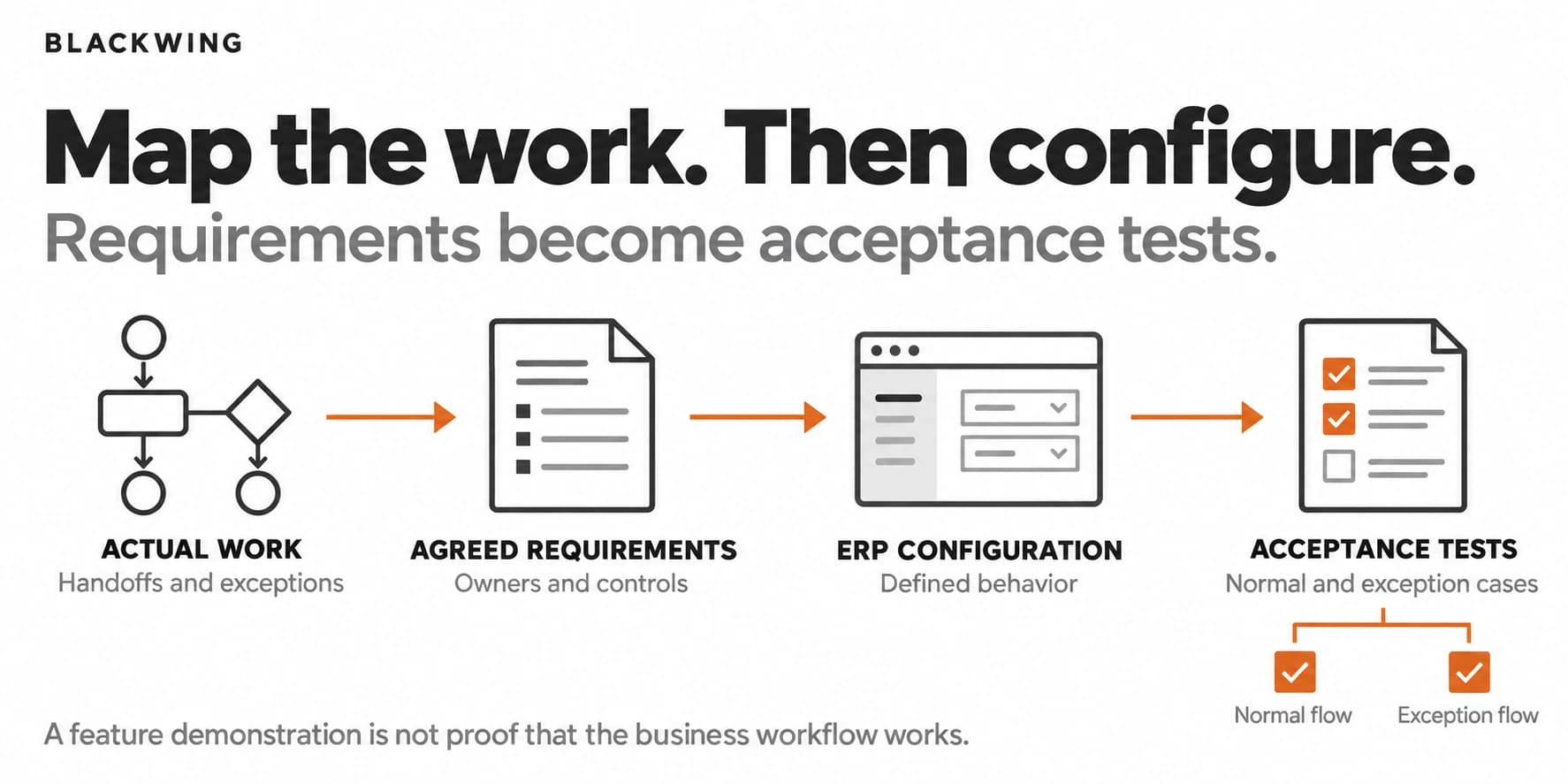
Map one important workflow, agree how it should operate, and translate those decisions into requirements and acceptance tests. That is a practical starting point for ERP implementation readiness in a growing SME.
ERP readiness is more than a requirements list
ERP, or enterprise resource planning, connects business functions and records in a coordinated system. The specific modules and capabilities depend on the product and implementation scope.
Readiness means the business can explain the work the system must support. It includes responsibilities, data definitions, approvals, exceptions, reporting needs, and a way to verify that the implemented process works.
The business case should begin with an operating problem. Are departments re-entering the same data? Are records inconsistent? Do handoffs disappear? Can existing tools address the problem with better structure? Answer those questions before assuming replacement is necessary.
Choose one workflow that crosses departments
Purchase-to-payment is a useful example because it connects a request, approval, supplier, order, receipt, invoice, and payment. Use it if it matters to your business; another cross-functional workflow may be a better starting point.
Do not map the entire company at maximum detail before learning anything. Choose a bounded process with a defined start, end, owner, and recurring pain.
For purchase-to-payment, the start might be an approved internal requirement. The end might be a completed payment and closed purchasing record. Agree those boundaries so people are discussing the same process.
Bring the people who actually perform the work into the discussion, including the person handling the awkward exceptions. A process map built only from management interviews can miss the workarounds keeping the business running.
Map what happens now without tidying it up
The current-state map should show actual handoffs and decision points. Record where information moves between email, spreadsheets, chat, paper, and existing software.
Identify duplicate entry, missing records, waiting, and informal approvals. Mark where the documented procedure differs from practice. This is discovery, not an exercise in making the business look organized.
For a purchase-to-payment workflow, ask:
- Who creates the request and checks it is complete?
- Who approves the commitment, and under which rules?
- Where is the current supplier record maintained?
- Who confirms receipt, shortages, or damage?
- How is an invoice checked against the order and receipt?
- Who authorizes payment and resolves a mismatch?
Keep purchasing and payment authority distinct. Your finance team should validate the controls relevant to its obligations.
For the broader distinction between current and future processes, see Blackwing's As-Is and To-Be article.
Decide the future process before configuring it
A future-state map is not the current process drawn in a software screen. It records the changes the business has deliberately agreed.
Perhaps the request needs fewer fields. Perhaps the supplier record should have one owner. Perhaps a missing receipt should prevent an invoice from following the normal route. These are business decisions before they are configuration choices.
Assign an owner to each decision and distinguish requirements from preferences. A control required by finance is different from a manager's preferred screen layout. Both may matter, but they should not be evaluated as the same type of requirement.
Avoid designing a process around an unverified feature in a demo. Confirm whether the system can support the agreed behavior, including limitations, integration requirements, and the implications of customization.
Give each important record an owner
ERP projects rely on shared data. Decide who creates, validates, and changes supplier, customer, item, account, and other relevant records.
Agree identifiers, required fields, naming rules, duplicate handling, and access rights. Separate draft records from records approved for use where the workflow requires it.
For example, an employee should not create a duplicate supplier because they cannot find the existing one. The process needs a search, correction, or request route. Sensitive changes, such as payment details, need the business's appropriate verification controls.
Identify which system owns each record during transition. Otherwise the team may keep updating both the old spreadsheet and the ERP without knowing which one is authoritative.
Turn process decisions into acceptance tests
An implementation requirement should describe observable behavior, not just "the system supports approvals."
Use a requirement-to-test record. These examples are illustrative, not a client implementation:
| Agreed requirement | Test scenario | Expected result |
|---|---|---|
| Complete requests enter approval | Submit a request missing its quote | Return it with the missing field identified |
| Partial delivery stays unresolved | Receive only part of an order | Keep the outstanding quantity open and visible |
| Authority follows approved rules | Submit a request beyond the approver's limit | Route to the authorized owner, not automatic approval |
Microsoft's implementation testing guidance similarly connects testing scope to business processes and requirements. The examples above should be adapted to your controls and chosen system.
Test rejected requests, unavailable approvers, changed orders, duplicate invoices, partial deliveries, and mismatches. Define who owns each exception and how it is resolved. These cases should not be discovered for the first time after launch.
Run end-to-end tests with the people who will use the process. A screen working individually does not prove that the handoff between purchasing, receiving, and finance works.
Start with a process the team can prove
Use this ERP readiness checklist before accepting configuration or expanding the rollout:
- One bounded workflow with an agreed start, end, and owner.
- A current-state map checked by the people doing the work.
- Agreed future approvals, handoffs, and exception routes.
- Named data owners, required fields, and access rules.
- Prioritized requirements linked to observable test outcomes.
- End-to-end test results reviewed by the business owners.
- A training, transition, support, and issue-resolution plan.
A tick means evidence exists, not that someone discussed the item in a meeting.
Business process improvement does not stop when the system goes live. Review whether the team follows the process, where exceptions accumulate, and whether the original operating problem is improving.
Blackwing helps connect process mapping and workflow implementation. Book an operations review if you are considering an ERP but still depend on unwritten rules to explain how work moves between departments.
Frequently Asked Questions
Why is process mapping important before ERP implementation?
It makes responsibilities, decisions, data, handoffs, and exceptions explicit before configuration. The map helps the business explain its requirements and test whether the implemented workflow supports them, rather than relying on assumptions from a demonstration.
Do small businesses always need an ERP?
No. The decision should reflect operating needs, complexity, cost, integration, and available alternatives. Process mapping can help determine whether better use of existing tools is sufficient or a more integrated system is justified.
What should an ERP readiness checklist contain?
Include a defined workflow, process owner, agreed approvals, data ownership, exception routes, prioritized requirements, access controls, acceptance tests, and a rollout plan. Adapt the checklist to the business and implementation scope.
What is an ERP acceptance test?
It is a specific scenario with an expected result that verifies a requirement. For example, test whether a partial delivery remains open and routes correctly to purchasing and finance. A completed demonstration alone is not an acceptance test.