
A product is selected. A supplier is ready. The team assumes the paperwork will catch up. Then a review comment changes the plan and the order is already moving.
That is not just an admin problem. It is a workflow problem between technical review, purchasing, and installation.
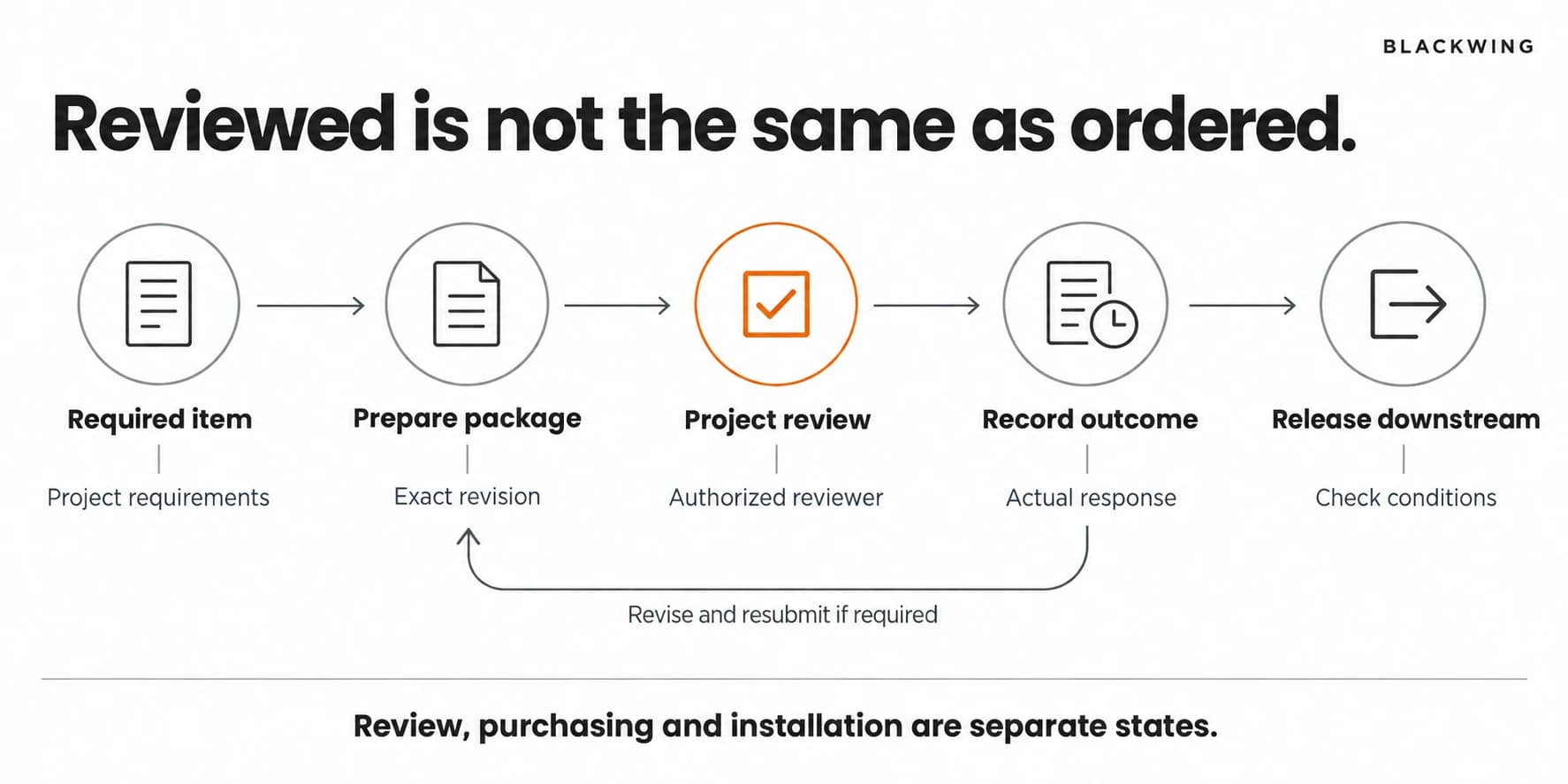
What Is a Construction Submittal?
Construction submittals are project information submitted for review through an agreed procedure. They can include product data, shop drawings, samples, and other specified material. Autodesk's submittal guidance describes the submittal log as a way to track review information and outcomes.
The required documents, review responsibilities, and meaning of each response depend on the project documents and contract. Do not treat every response as blanket approval or assume review transfers responsibility for your work.
This article focuses on operational coordination. Qualified project professionals remain responsible for technical decisions and applicable contractual interpretation.
Start With the Required Items, Not an Empty Board
Build the initial register from the project's actual requirements. Have the appropriate project person confirm what must be submitted, by whom, and through which route.
For each item, connect four dates: information needed from the trade or supplier, submission target, review needed for planning, and downstream order or installation need. Work backward from the dependent activity, then check whether the lead time is realistic.
Do not invent a universal review duration. Use the agreed project requirements and confirmed expectations. A desired date and a committed date deserve different fields.
Give Each Submittal One Visible Journey
Prepare and check completeness
Assign one internal coordinator and one provider for each item. Check the reference, specification section where applicable, revision, attachments, and required identification before sending it.
If a supplier document describes several alternatives, make the proposed selection clear through the project's approved method. Reviewers should not have to guess which option the team intends to use.
Submit through the agreed route
Record the actual submission date and version. Keep the submitted package intact so the team can identify exactly what was reviewed.
Do not overwrite the file with a later revision under the same name and expect everyone to remember the difference. That turns the record into a moving target.
Record the response precisely
Copy the actual response status and reference the reviewer comments. Avoid translating a qualified response into an internal green checkbox that says only "Approved."
If a resubmission is required, create the next revision, assign the corrections, and link it to the earlier package. The history should explain what changed without a search through someone's inbox.
Release the right information downstream
Before a purchase or installation commitment that depends on review, the responsible person checks the applicable outcome and any remaining conditions. If the project permits a different route, document that authority explicitly.
Share the reviewed revision with the people who need it. An approved file that is not connected to purchasing or field work is still a disconnected file.
A Small-Team Submittal Register
| Field | Why it matters | Example entry |
|---|---|---|
| Item and project reference | Identifies the requirement | Door hardware package, Job A |
| Provider and coordinator | Separates preparation from follow-up | Supplier / office coordinator |
| Current revision | Prevents ambiguous versions | Revision 2 |
| Review route and respondent | Shows where the item must go | Agreed project reviewer |
| Needed-by date | Connects the review to planned work | Before ordering milestone |
| Actual response | Preserves the real outcome | Exact project response label |
| Next action and owner | Makes waiting actionable | Supplier revises marked items |
The example is illustrative. Use your project's actual response labels, not a substitute classification that weakens them.
Keep Purchasing Status Separate
"Submitted," "reviewed," "ordered," and "delivered" describe different events. Keep them separate even when one person coordinates all four.
Your submittal register can link to the construction procurement process, but it should not collapse the two. Purchasing tracks supplier commitments and delivery. The submittal process tracks required information and the applicable review outcome.
For example, an item may have a reviewed package but an expired quote. Another may have a current quote but an unresolved technical comment. Both need action. Neither should appear simply "Ready" without explaining the condition.
An Illustrative Breakdown
Consider a remodeler ordering a finish product. The supplier sends updated data after the first package is returned with comments. The office attaches the new document to the board but leaves the original status unchanged.
The purchaser sees a green status and proceeds, while the project coordinator believes a resubmission is still required.
A controlled process ties the response to the exact revision. The new package remains awaiting its required review, and the downstream decision stays visible. No one needs to guess which attachment the status describes.
Review Exceptions Before They Become Urgent
A short coordination review should identify items with missing inputs, overdue responses, repeated resubmissions, and downstream work approaching without the required outcome.
Ask what decision is needed, not just how many submittals are open. Ten routine items due later may matter less today than one unresolved package tied to an imminent order.
Use this information to adjust the plan through the proper project authority. The register is not permission to bypass review because a deadline is inconvenient.
Conclusion: Connect Review to Execution
A useful construction submittal process has clear requirements, controlled versions, exact response records, and a visible link to dependent work. Software can support it. Software cannot decide what "reviewed" means for your project.
Blackwing helps small and midsize construction businesses design these handoffs and configure practical tracking systems. Book an operations review to examine where preparation, review, and purchasing lose contact.
Frequently Asked Questions
What is the difference between an RFI and a submittal?
An RFI asks for clarification of project information. A submittal provides required information for review, such as product data or shop drawings. Their procedures may interact, but one should not silently replace the other.
What belongs in a construction submittal log?
A submittal log should identify the required item, provider, coordinator, current revision, review route, submission and needed-by dates, actual response, linked comments, downstream dependency, and next action owner.
Can ordering begin before a submittal is reviewed?
Whether ordering can begin depends on the project requirements, contract, and authorized decision. Do not assume it is permitted. Make any required review condition and exception authority explicit before committing.
How should resubmissions be tracked?
Track each resubmission as an identifiable revision linked to the earlier package and response. Preserve prior files, assign the requested corrections, and ensure statuses refer to the exact version under review.