
That distinction matters because daily reports can influence later conversations about progress, deliveries, delays, and work completed. A fluent sentence is not evidence that a crew count, quantity, incident, or cause was recorded correctly. Treat generated text as a starting point for a person who has the authority and context to check it.
Start with a reporting process, not a prompt
Before adding a model, define the report fields the business actually needs. One project may record work areas, activities, deliveries, constraints, visitors, or follow-up items. Another may use a different set. The existing construction daily-report guide covers the underlying field-to-office reporting routine. An AI layer should support that routine, not replace it with a generic form.
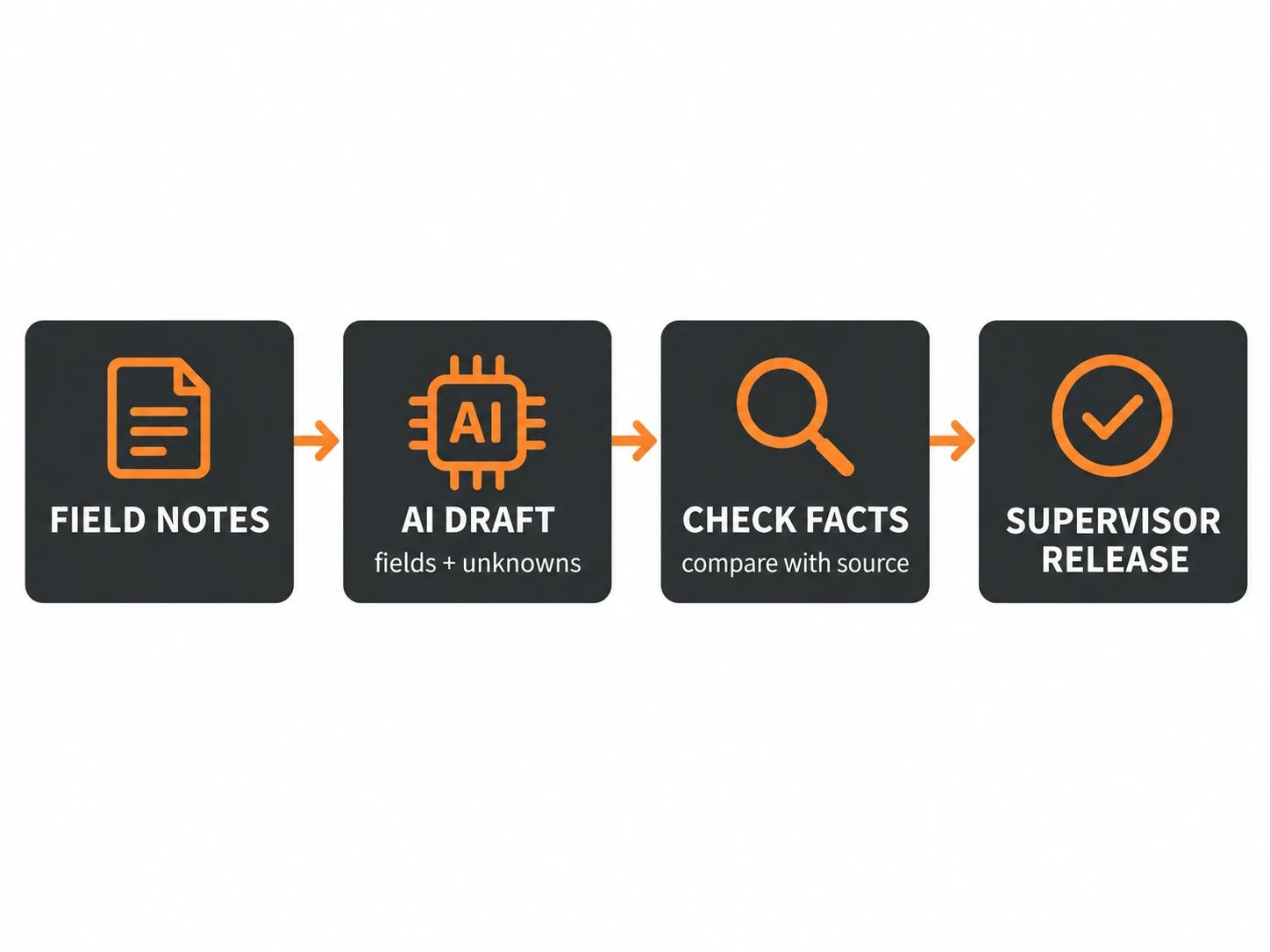
Keep the raw input beside the draft. It might be a voice transcription, typed note, or an image with a short caption. Record who supplied it and when, using the project’s normal controls. Do not let the model silently combine several notes into one statement if their authors, times, or work areas differ.
OpenAI’s audio documentation describes pathways for transcribing audio, and its structured-output guide explains how a response can be constrained to a defined schema. Those capabilities can help move words into known fields. They do not prove that the transcription heard a name or quantity correctly, or that a schema-shaped response is factually true. OpenAI audio and voice · OpenAI structured outputs
Separate the model’s job from the rules and the supervisor
Use ordinary rules for tasks with clear conditions. A required-field check can show that the date or project identifier is missing. A known project list can flag an unrecognized name. A deterministic duplicate check can warn that a report already exists for the same job and date. A rules engine can route a draft to the right reviewer based on project or role.
Use a language model where the input is varied and meaning must be organized. It can propose a concise activity summary, associate a note with a report section, or list details that appear absent. It should preserve uncertainty. If a note says “a few panels arrived,” the draft should not convert “a few” to a number. If the note does not mention crew size, mark it unknown rather than estimating.
The supervisor checks the source against the draft, corrects or rejects fields, and decides whether the report is ready for release. That review includes checking project vocabulary, date, location, quantities, incidents, and whether a statement describes observed work or someone’s expectation. The system should show who made the final change and preserve the approved record under the project’s existing process.
Worked example: one note, one bounded draft
Hypothetical example: A foreman records: “Crew back on south wall after lunch. Two panels arrived. Waiting on lift inspection.” An AI-assisted draft might place “south wall work resumed” under activity, “two panels arrived” under delivery, and “lift inspection pending” under constraint. It can separately show that crew count, exact time, and the inspection owner were not stated.
The supervisor checks whether the note came from the right job and work area, verifies the delivery detail against the source, and supplies a missing value only if another reliable record supports it. If no record confirms the crew count, it remains unknown. If the inspection status changed later, the supervisor adds the later update with its own source and time rather than rewriting the original note as if it had been known earlier.
This workflow avoids a tempting but risky shortcut: asking a model to “complete” a report. Completion should mean that the required person reviewed the facts, not that the prose sounds finished.
Design the screen around review
Show the original input and the proposed report field together. Make it easy to compare a phrase with its source, edit a field, reject an extraction, and leave it blank. Distinguish model-generated text from user-supplied text. If a field came from a photo or audio file, make the source accessible to the reviewer.
Give the reviewer an explicit “not stated” option. Without it, people may feel forced to choose a value. For conflicts, such as two notes with different quantities, show both and ask for a human decision. Do not resolve the conflict by selecting the newer or more confident-sounding text unless the project’s approved procedure defines that rule.
Keep permission and retention choices specific to the tools the company uses. Use the smallest set of source material needed for the task, and confirm current product and company requirements before any real project or employee data enters a new service. This article does not make a blanket privacy or retention claim for any vendor.
Pilot against a rules-only baseline
Choose a reporting period or group of projects that reflects ordinary variation, and keep the current manual process as the comparison. Measure the time from raw note to verified report, the number and type of corrections, how often the model flags missing information, and whether a reviewer finds an unsupported detail. Review an appropriate sample of reports against the original input, including fields that were left blank.
Set success criteria before the pilot with the people who own report quality. A shorter draft time is not useful if supervisors spend more time correcting invented details. Track corrections by category, such as missed field, wrong project term, quantity error, unsupported inference, or formatting edit. Decide what should stop the pilot, who can pause it, and how approved records are stored.
If a required-field rule solves most of the delay, keep that rule. Use a model only for the variable interpretation that remains. That keeps the system easier to explain and makes the review workload visible.
If field information repeatedly arrives late or in unusable formats, the problem may sit in the reporting workflow rather than in the model. Blackwing’s construction operations work focuses on improving how office and field teams share job information. A 30-minute Operations Review can help identify where a reporting handoff is getting stuck and what to examine next.
Frequently asked questions
Can AI submit a daily report automatically?
This workflow should produce a draft for a designated reviewer. The supervisor checks source details and decides whether it is ready to enter the project record. Automatic submission would remove the human verification that keeps the record accountable.
Can a voice transcription safely capture quantities and names?
It can provide a useful draft, but names, numbers, site terms, and noisy recordings can be misheard. Keep the source available and require verification before those details are treated as confirmed.
What if the field note leaves out a required detail?
Show the field as missing or unknown and route it to the person responsible for supplying it. Do not ask the model to infer facts from context when the source does not provide them.
How should a contractor measure the pilot?
Compare the AI-assisted path with the existing process. Track verified completion time, reviewer corrections, unsupported details, and unresolved fields. Decide criteria and pause conditions before the pilot starts.