
A meeting summary. A list of unresolved supplier questions. A draft follow-up that uses the actual project record rather than someone's memory.
These are unglamorous jobs. They are also sensible places to start. Use AI to prepare information before you let it make commitments.
The distinction matters in construction. A fluent summary can still miss a condition. A polished email can accidentally promise a delivery date nobody confirmed. The output looking professional is not the same as the output being correct.
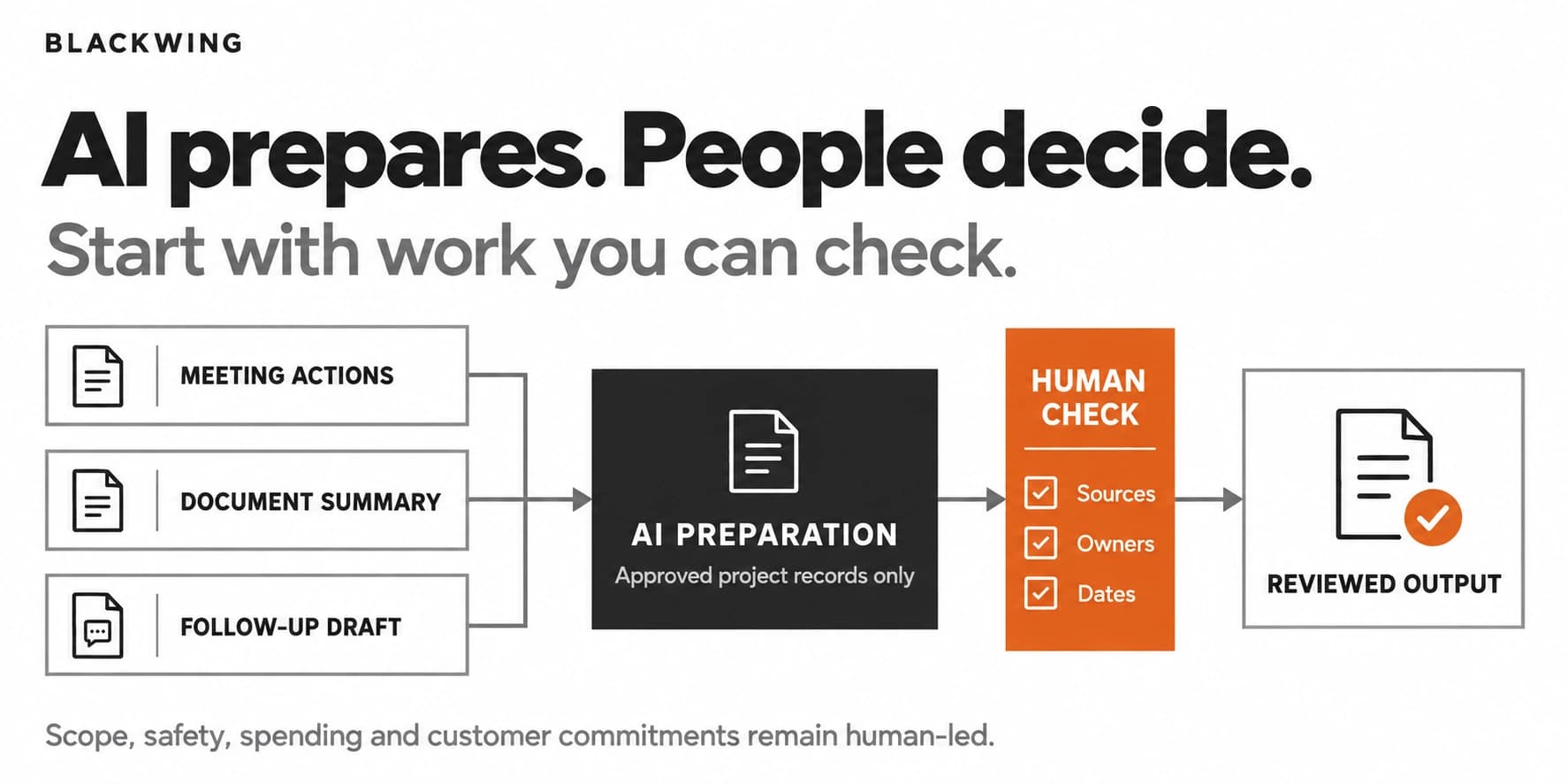
Start with the task, not the subscription
Construction workflow automation means using software to move defined work between people and systems. AI can help interpret and prepare information inside that workflow; it should not silently inherit the authority of the person it assists.
What starts the work? Which information does it need? What should come out? Who checks it, and where does the approved result go?
If those questions are difficult to answer, buying another tool will not settle them.
Industry training is moving toward these practical uses. AGC's September 2026 AI for Construction Project Management workshop covered meeting summaries, action tracking, communication, and documentation while keeping project managers responsible for decisions. That is a useful direction, not evidence that every contractor has already adopted AI.
Choose a task that repeats, uses current records, can be checked without recreating everything, and contains mistakes before they reach a customer or jobsite.
Do not begin with an automatic bid submission, a safety decision, or a system that approves scope changes. The consequences are too different from drafting an internal checklist.
Three office tasks worth considering
Use this starting comparison, then adapt it to your actual records:
| Office task | Approved input | Human review boundary |
|---|---|---|
| Meeting action list | Meeting record and open items | Confirm owners, dates, and decisions |
| Document summary | Named current document versions | Verify references; escalate technical questions |
| Follow-up draft | Current unanswered-item register | Check claims and timing before sending |
Start with the row where your inputs and reviewer are strongest, not the task with the most impressive demo.
Turn meeting notes into a draft action list
An AI tool can help organize approved meeting notes into decisions, open questions, and proposed actions. Give it a consistent output: task, owner, due date, source, and unresolved issue.
Tell it not to invent an owner or deadline. A blank field marked "needs confirmation" is more useful than a confident guess.
The project manager then checks the draft against the notes and confirms assignments. Only the reviewed list becomes part of the project system. Recording consent and the firm's data-handling rules still apply when transcripts are involved.
Summarize a controlled document set
Ask AI to summarize a specific set of current project documents, with references to the source page or section. This can help a coordinator prepare for a meeting or identify questions for the responsible specialist.
Keep approved and superseded versions separate. Ask the tool to flag conflicting dates or missing information rather than choose a convenient answer.
The boundary should be explicit: this is preparation, not engineering interpretation, contract advice, or authorization to build. Someone qualified must make those decisions.
Prepare follow-ups from an open-items register
A coordinator can use AI to draft supplier or subcontractor follow-ups from a maintained register. Each item should already contain the project, question, responsible contact, previous response, and next action.
The tool can assemble a useful message. It should not infer that an unanswered quote has been accepted or that a supplier's estimate is a guaranteed delivery date.
Keep the first version draft-only. Sending messages introduces a separate permission and review decision.
A simple example for a small remodeler
Imagine a remodeler running three active projects. This is an illustrative scenario, not a client case study.
After the weekly coordination meeting, the office manager spends time sorting handwritten notes and chasing the same missing information. The business chooses just the action-list task for its first AI workflow.
The input is the approved meeting record and the current open-items register. The AI produces a draft grouped by project, with source references and empty fields wherever the meeting did not establish an owner or date.
The project manager checks it, resolves the gaps, and accepts the actions. The office manager puts those approved actions into the existing work-management system.
Notice what has not changed. The AI does not approve a variation, move a crew, or tell a customer when the job will finish. It reduces the preparation work around decisions that still belong to people.
That is a real workflow. "Everyone should try AI" is an announcement.
Keep project context under control
AI for construction project management becomes unreliable when the inputs are unreliable. Before the pilot, agree where current documents live, how revisions are identified, and which records the tool can access.
Use approved accounts and the access controls your business needs. Check the provider's current retention and data-use terms before sharing confidential drawings, contracts, pricing, employee information, or customer details. Do not assume every account or integration handles data the same way.
Give the workflow a named owner. They should maintain the instructions, sample outputs, access settings, and review checklist. Otherwise each employee rebuilds a slightly different process, and nobody knows which version is working.
For the wider operating structure, see Blackwing's article on AI business architecture. The starting task still needs its own clear boundaries.
Measure the reviewed result, not the demo
Run the pilot on a small, representative set of work. Include messy cases: incomplete notes, a conflicting document, and a question with no agreed answer.
Track preparation, review, correction, and recording time, plus missed actions and inappropriate commitments. Compare total time per accepted output with similar work under the previous method. A fast draft is not a saving if checking it takes longer than writing it yourself.
Do not set a universal accuracy target. Define the acceptance standard around the risk of the task. A missing internal owner can be corrected before release; an incorrect technical instruction needs a much stronger boundary.
Expand only when the reviewed output is useful and the team understands when to stop. Sometimes the next improvement is a better register, not a more capable model.
Give the first workflow a clear finish line
The first AI workflow should leave you with one repeatable task, approved inputs, a review owner, and an identifiable final record. Keep the scope small enough that people can explain it without a presentation.
Blackwing helps connect process design and workflow systems so the improvement survives beyond the first demonstration. If your office work depends on people repeatedly reconstructing project context, book an operations review to identify a sensible first workflow.
Frequently Asked Questions
What should a small contractor automate with AI first?
Start with a repeated, reviewable office task such as preparing an action list, summarizing approved documents, or drafting follow-ups. Use current source records and keep a person responsible for checking the result before it is used.
Can AI manage a construction project on its own?
AI can assist with parts of project administration, but that does not give it authority over safety, engineering, scope, spending, or customer commitments. Define each permitted action separately and retain qualified human oversight where the consequences require it.
Do we need new project management software to use AI?
Not necessarily. Begin with the process and the records you already use. Consider new software only when a specific gap in access, control, integration, or usability prevents the workflow from operating reliably.
How do we know whether construction AI is saving time?
Measure the full workflow, including preparation, checking, corrections, and recording the approved result. Compare it with the previous method on similar work. Drafting speed alone is not a reliable measure of business value.