
A caller can mention a budget, a possible date and a property without authorizing any commitment. If the generated summary changes “we might start in June” into “start date: June,” the CRM becomes more organized and less truthful at the same time.
Separate four different outputs
| Output | Meaning | Required control |
|---|---|---|
| Call event | A conversation or call attempt occurred | Stable event reference and correct contact match |
| Transcript or source note | A record of what was captured | Appropriate permission, access and known limitations |
| AI summary | A model-prepared interpretation | Review of material facts and uncertainty |
| CRM change | An update to business records or workflow | Authorized fields, qualification rules and audit trail |
These can be connected without being treated as the same thing. Logging a call should not require pretending that an opportunity exists. Saving an AI summary should not automatically authorize a price, schedule promise or customer message.
Aircall’s monday.com V2 integration documentation describes call logging and optional AI transcription and insight logging as configurable capabilities. Those features do not define your company’s qualification criteria or approval boundaries.
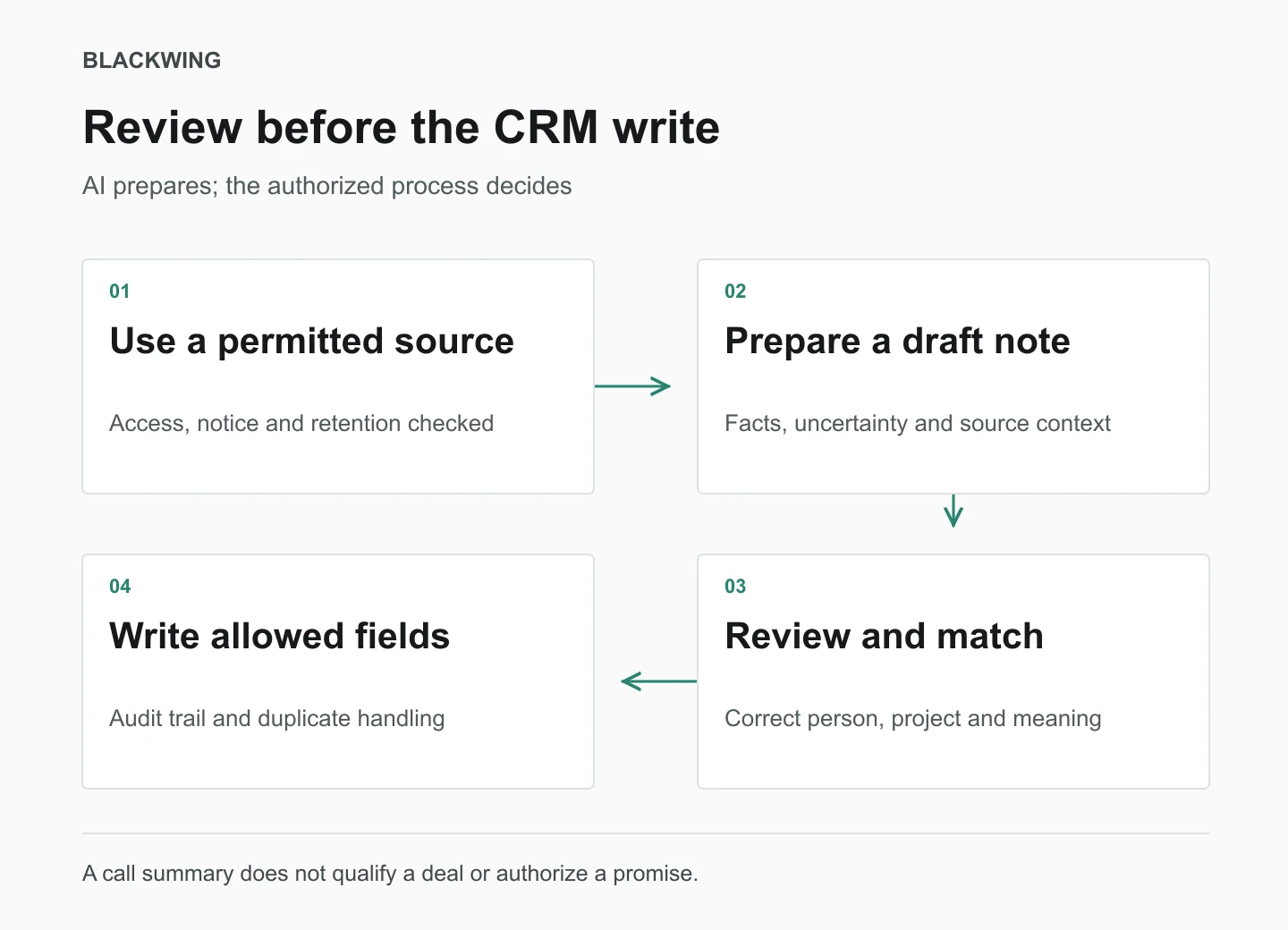
Design the permission boundary before the prompt
Confirm that the source can be collected and processed under the applicable requirements, customer notices and company policies. Review vendor access, retention and who can see recordings or transcripts. Do not enable call recording or send private conversations to a model merely because the integration makes it easy.
For an initial pilot, keep the output draft-only. Allow the tool to prepare an internal note with source references. Do not allow it to send messages, change deal stages, create duplicate contacts or overwrite commercial fields until those separate actions have been tested and authorized.
Ask for a structured draft with honest unknowns
- Customer’s stated project objective, without adding a technical solution.
- Project type and location only where actually discussed.
- Budget and timing as customer statements, with uncertainty preserved.
- Open questions, named commitments and proposed next actions.
- Relevant source segment or timestamp where the platform supports it.
- Fields requiring confirmation rather than a guessed value.
Include an instruction to distinguish a direct customer statement from the model’s interpretation. That instruction is useful but not a guarantee. The review process still needs to catch wrong names, dates, numbers, negation and attribution of statements to the wrong speaker.
Match the record before adding the note
Check whether the caller already exists and whether the conversation belongs to an existing project. Phone numbers may be shared or reassigned; caller ID is not a universal identity guarantee. Send ambiguous matches to a review queue instead of attaching private project notes to the first similar contact.
Use the call’s stable reference to avoid repeated processing. A retried integration event should not create a second note or opportunity. Preserve the status of failed or partial updates so somebody can reconcile what actually reached the CRM.
A reviewed summary should preserve the meaning
Illustrative source statement: “We are considering a garage conversion, but we need to speak to the designer before deciding whether to proceed.” A useful draft records the possible scope, the design decision and the need for a later fit conversation. It does not mark the deal qualified, forecast an award or promise an estimating visit.
The reviewer confirms the statement, matches the contact and assigns the agreed next action. If the transcript is unclear, the record says confirmation is needed. A clean-looking empty field is better than a confident wrong one.
The next decision follows the contractor lead qualification process. The underlying contact and project links belong in the construction CRM structure, not in an isolated transcript folder.
Test the failures before expanding access
Use permitted test material covering an unclear date, an existing contact, a non-sales call, a customer declining, missing audio and a repeated event. Check the draft against the source and verify that no prohibited field or external message changed.
Measure review time, material corrections, unmatched records and duplicate or failed updates. Include the time needed to repair errors. A fast summary is not a productivity result if the team spends longer correcting the business record afterward.
Keep the business decision with the business
The useful model is preparation with a controlled route into the system. Start with one call type and a small field set. Expand only when the evidence supports it and the authority is clear. AI can reduce transcription effort without becoming the person who decides which project the contractor should pursue.
Blackwing helps small construction teams connect their sales process, records and operating systems. Start with the handoff that is failing, then agree the owner, information and exception route before automating it.
Questions contractors ask
Can AI call summaries automatically update a contractor CRM?
Some integrations support logging transcripts and generated insights, but the permitted workflow depends on the product configuration and company rules. Start with reviewed drafts, validate contact matching and restrict writes to authorized fields. Call logging is not automatic opportunity qualification.
What should a person verify in an AI call summary?
Check identities, project scope, numbers, dates, negation, customer uncertainty, speaker attribution and any commitments. Confirm that the note is attached to the right contact and project. Unclear source information should remain marked for clarification.
How should contractors measure the value of AI call notes?
Compare the whole workflow: preparation, review, corrections and CRM reconciliation. Track material errors, duplicate records and failed updates as well as time spent. Do not infer business ROI from the speed or length of a generated summary alone.