
This sounds like a communication problem. It is also a record-design problem.
A CRM for small construction businesses should connect people, project opportunities, conversations and next actions. If it only stores names and phone numbers, you have built a contact list with a subscription attached.
What should a construction CRM do?
A customer relationship management system is a shared record of commercial relationships and the work needed to maintain them. For a contractor, that includes a homeowner with a current inquiry, a property manager with several projects and a previous customer who returns next year.
The records need to stay connected without becoming one long, unreadable note. Major CRM systems support relationships between records such as contacts, companies and deals. HubSpot's documentation illustrates linking multiple people and their company to the same deal, and connecting related activity history. Specific features depend on the product and subscription. HubSpot's record-association documentation.
The important decision is how your business uses that structure. Buying the software does not make the decisions for you.
Separate the person from the project
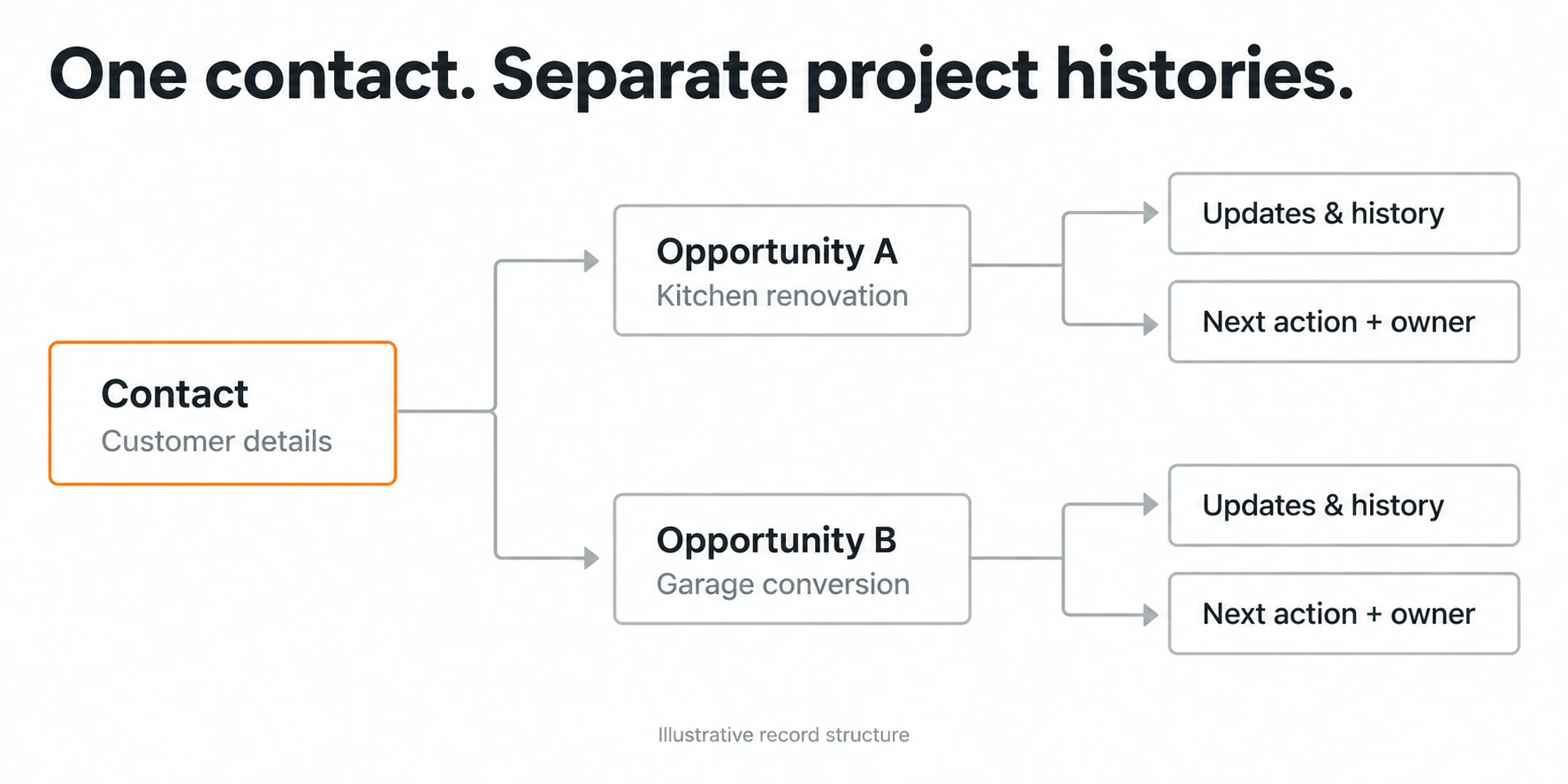
One contact can have several opportunities. One opportunity can involve several contacts. Treating every project as a new customer breaks the history and distorts reporting.
For an illustrative example, a property manager asks for a repair at one building and a refurbishment at another. Those are two opportunities connected to one contact and, where relevant, one company. Each has its own scope, location, estimate, status and next action.
The repair may be won while the refurbishment is still being qualified. A single customer status called "in progress" cannot explain both.
Start with four types of information:
- Contacts and organizations: who you know, their role and how to reach them.
- Opportunities: a specific potential project with a commercial outcome.
- Activities: calls, messages, meetings, notes and documents linked to the right opportunity.
- Tasks: the next action, responsible person and due date.
Keep active construction delivery in the appropriate project system. The CRM should link to that project once work is awarded, not duplicate every site task.
Record what the next person needs
A useful contact record contains reliable contact details, communication preferences, relationship type and linked projects. Do not collect unrelated personal information simply because a field exists.
For the opportunity, record:
- Project name or reference, location and requested work.
- Original lead source and evidence where available.
- Assigned owner and qualification outcome.
- Current stage and the date it entered that stage.
- Estimated value with its basis clearly stated.
- Latest proposal version and document link.
- Most recent meaningful update.
- Next action and due date.
- Final decision, date and reason when known.
Preserve the source instead of guessing. A customer's referral, a paid platform inquiry and an organic website inquiry are different acquisition paths. Keep Thumbtack lead records and Yelp inquiries connected to their original source. An existing contact booking a call is not automatically a newly acquired lead.
Define stages by events, not moods
"Hot" is an opinion. "Site assessment completed" describes something that happened.
A simple construction pipeline might include new inquiry, qualification, assessment scheduled, scope or estimate in preparation, proposal sent and decision pending. Close the opportunity as won, lost or not proceeding when the relevant event occurs.
Write a short entry condition for each stage. For example, moving to proposal sent requires a dated proposal reference and a planned follow-up. Moving to won requires your business's approved evidence of award, not an encouraging phone conversation.
Do not add fourteen stages because the software allows it. Use enough detail to explain where work is waiting and what should happen next.
Make updates part of the work
The best moment to record a call is immediately after the call, while the details are still clear. Ask for a short useful update rather than a transcript:
"Customer wants the alternate finish priced. Estimator will update proposal revision B by Thursday. Follow-up agreed for Friday."
That note explains a decision, a dependency and an action. "Spoke to customer" explains almost nothing.
Give each open opportunity one accountable owner. Other employees can contribute without leaving everyone equally responsible and nobody actually responsible.
Use a short daily queue for new inquiries and due actions, then a weekly pipeline review for stalled opportunities. If the owner must read every record personally to keep it moving, the CRM has not yet reduced the dependency.
Control duplicates, access and automation
Before creating a contact, check whether it already exists. Before creating an opportunity, check whether the inquiry concerns an existing project. Link new information carefully instead of merging unrelated work simply because the customer is the same.
Limit access according to the job people need to do. Sales history can include sensitive customer information and commercial documents. Permissions, backups and retention need deliberate choices.
Automate only after the manual workflow makes sense. A form-to-CRM integration should be tested for repeated submissions, missing fields, the same person requesting a second project and a failed import. Verify the resulting records, not just an automation's success notification.
Keep human review for scope commitments, pricing decisions and sensitive customer messages. Faster record creation is useful. Faster mistakes are less impressive.
Start with current work, not a perfect historical migration
You do not need to import every old email before the CRM becomes useful.
Begin with open opportunities, reliable contact details and the information required for the next decision. Clean obvious duplicates, assign owners and agree the stage definitions. Add valuable historical relationships in manageable batches with a documented source.
When a job is won, transfer the approved scope, latest commercial documents and customer commitments through an estimating-to-project-management handoff. Keep the relationship history connected so the next inquiry does not start from zero.
If you are still choosing a CRM, define this record model first. It gives you something concrete to test in a product demonstration.
A CRM should make the business less dependent on memory
The practical test is simple: can a colleague open an opportunity and understand the customer, current position and next action without calling you?
Blackwing helps construction businesses map their sales process and implement CRM structures that support it. If your contacts are organized but the work still depends on somebody remembering the conversation, book an operations review.
FAQ
What should a small construction business track in a CRM?
Track contacts, organizations where relevant, project opportunities, source, stage, owner, proposal versions, meaningful updates and next actions. Keep the records linked so one customer can have several projects without losing the relationship history.
Is a customer contact the same as a sales opportunity?
No. A contact is a person. An opportunity is a specific potential project or sale. One contact may have several opportunities, and several contacts may be involved in one opportunity. Separate records make status and reporting clearer.
Can a spreadsheet replace a construction CRM?
A controlled spreadsheet can support a small, simple pipeline if ownership and updates are consistent. It becomes harder to manage linked contacts, multiple projects, activity history and permissions as complexity increases. Choose the tool based on those needs, not team size alone.
Should a construction CRM also manage the job site?
It should connect sales to delivery, but it does not need to duplicate every construction task. Link the awarded opportunity to the project system and transfer the approved scope, documents and commitments through a clear handoff.