
"It is somewhere in the folder" is not document control. Neither is putting FINAL at the end of a file name three times.
The real test is simpler: can the field lead tell which information applies, what changed, and who to ask when two records disagree?
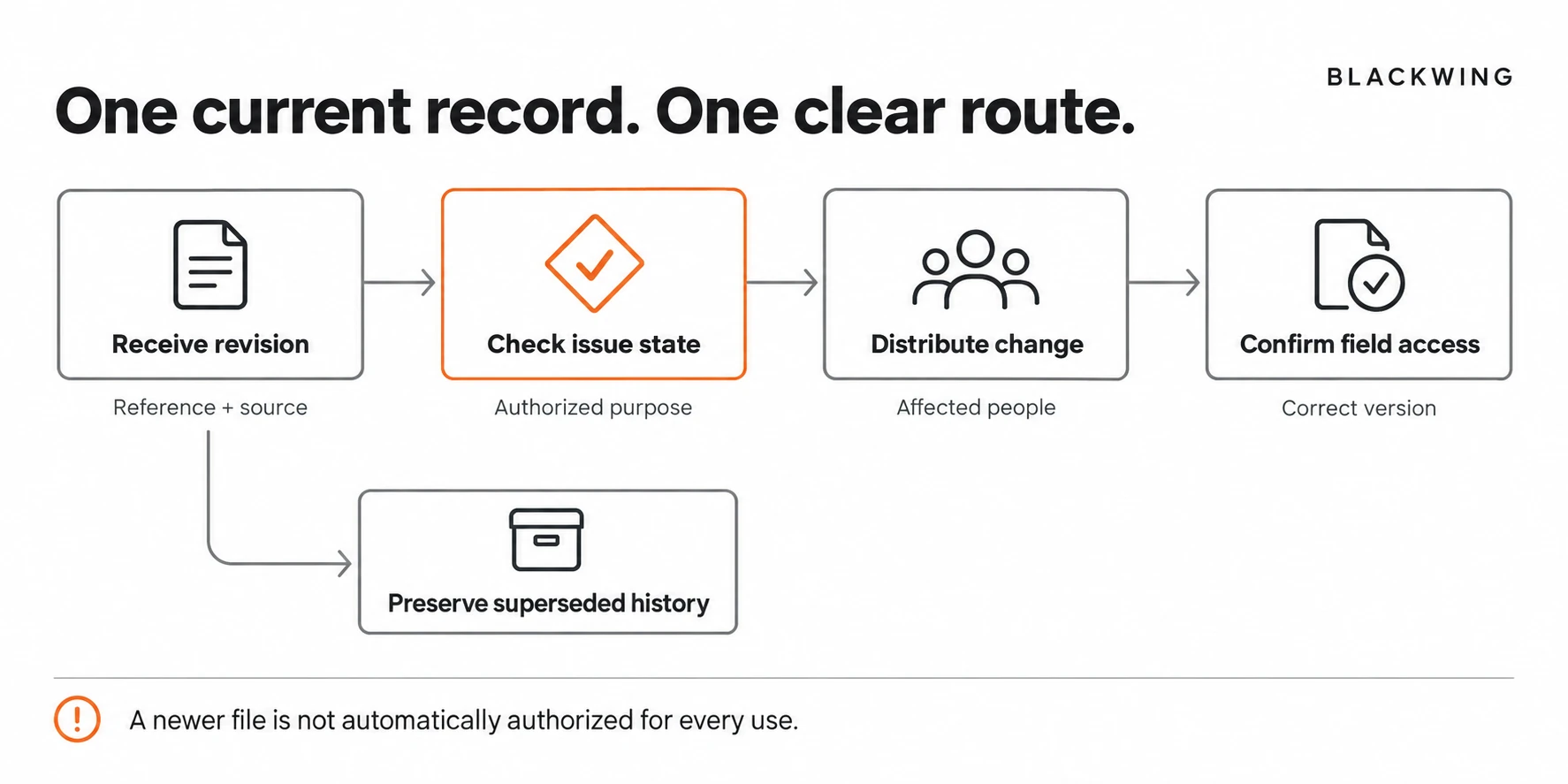
Why a Shared Folder Is Not Enough
A shared folder solves storage. It does not automatically solve authority, version history, or distribution.
A drawing can be uploaded without being ready for use. A revised schedule can exist without affected subcontractors receiving it. A downloaded copy can remain on a phone after the source has changed.
Autodesk's construction administration overview identifies document control as a distinct coordination responsibility. The practical implication for a small business is to define the document's lifecycle, not simply buy more storage.
Keep technical approvals with the appropriate project professionals. A tidy naming convention is not proof that a drawing is technically suitable or authorized for construction.
Separate Document Identity From Document State
Identity answers "Which document is this?" State answers "What are we allowed to do with it?"
Use a consistent project reference, document type, subject or drawing number, revision, and issue date. Then record the applicable state through the project's agreed procedure.
For internal coordination, states might distinguish received, awaiting review, issued for the stated purpose, and superseded. Do not invent a label such as "Approved for construction" unless the authorized project process actually gives it that status.
A folder called CURRENT should contain controlled links or identified records, not whatever someone last dragged into it.
A Practical Four-Part System
1. One register for important issued information
Start with documents that can affect work: drawings, specifications, agreed scope records, schedules, reviewed submittals, and formal clarifications. You do not need to register every casual note.
Record the reference, revision, source, issue date, stated purpose, record owner, and link. Add the affected team or trade and the distribution date when the information changes their work.
2. One controlled place to find the current record
Give the team a predictable project location. Use permissions that match their role and protect sensitive commercial or personal information.
Avoid maintaining competing "current" folders in the office drive, project board, and messaging app. A board can point to the controlled source without becoming another version of it.
Downloaded or printed copies need a practical recheck rule. The rule should explain how users confirm a revision before dependent work, especially where connectivity is limited.
3. One change-distribution route
An update should identify the changed reference, revision, affected work, recipients, and any action required. "New files uploaded" is not enough when a trade needs to reconsider its plan.
Use the project's required communication route. A reminder in chat may help, but it should not replace formal distribution where that is required.
Record acknowledgement for the important handoffs you own. If a recipient raises a conflict, keep the issue open rather than interpreting silence as agreement.
4. A preserved history
Keep superseded records identifiable and separate from the normal current-work view. Do not delete the evidence of what was issued simply to make the folder look clean.
Retention and legal-record requirements vary. Set those with the appropriate company or project adviser. This operational framework does not establish a universal retention period.
A Minimum Document Register
| Field | Question it answers | Control |
|---|---|---|
| Project and document reference | Which information is this? | Stable identifier |
| Revision and issue date | Which version are we viewing? | No silent overwriting |
| Source and stated purpose | Where did it come from? | Preserve original issue information |
| Applicable review state | What can proceed? | Use the authorized project status |
| Distribution and affected work | Who needs the change? | Named recipients and action |
| Owner and next review | Who keeps it reliable? | One accountable record owner |
The register can be a spreadsheet, a project system, or a document platform. The control comes from the way it is maintained.
An Illustrative Revision Problem
Imagine a contractor with three active jobs. A coordinator receives a revised layout, uploads it to the shared drive, and assumes the field sees it. A foreman continues using a PDF downloaded earlier in the week.
Both people have a document. Only one has the latest issued version.
The improved process records the new revision, preserves the earlier issue, identifies the affected activity, distributes the update through the agreed route, and checks the field handoff. The foreman no longer has to infer which attachment is current from the time it arrived in a group chat.
This is an illustrative information-control example, not an instruction to resolve a design conflict without specialist review.
Make the System Easy Enough to Use
If a field user needs to open six folders to find one drawing, the process will be bypassed. Test it on a phone with someone who actually uses the information.
Ask them to find the current record, identify the revision, and locate the source of a recent change. Observe where they hesitate. Fix that path before creating a longer procedure.
Our article on the construction RFI workflow covers clarification handoffs. Document control owns the reliable record those handoffs point to.
Conclusion: Reliable Information Needs a Route
Construction document control is not about building the largest folder tree. It is about making the correct information identifiable, available, and properly distributed.
Blackwing helps construction teams connect document ownership, workflow rules, and practical systems. Book an operations review if your team has plenty of files but no reliable way to know what is current.
Frequently Asked Questions
How can a small contractor start document control?
Start with one project, one controlled document location, a register for important issued records, a consistent revision convention, and an owner for distributing changes. Follow the project's existing approval and communication requirements.
Is SharePoint enough for construction document control?
SharePoint can support document storage and version management, but suitability depends on configuration, permissions, field access, and project requirements. The business still needs clear ownership, issue rules, and change-distribution procedures.
Should superseded construction drawings be deleted?
Do not delete superseded drawings merely to simplify the current-work view. Preserve identifiable history and manage retention under the applicable company, contract, and legal requirements. Separate archive access from the normal current-document route.
What is the difference between revision and approval status?
A revision identifies a document version. Approval or issue status describes its applicable review outcome or permitted purpose. A newer revision is not automatically authorized for every use.