
A construction operations dashboard should show the exceptions and decisions affecting the next work period, with links to the underlying evidence. Small and midsize contractors usually need a focused weekly review more than another page of charts.
Start with the decisions. Choose the metrics afterward.
What Is a Construction Operations Dashboard?
A construction operations dashboard brings selected project information into one view so the team can identify constraints, make decisions, and follow through. It is not a substitute for detailed schedules, cost records, or technical review.
Procore's construction KPI guidance describes selecting a limited set of measures linked to business objectives. That principle is useful. It does not mean every contractor needs the same indicators or should adopt an unverified industry benchmark.
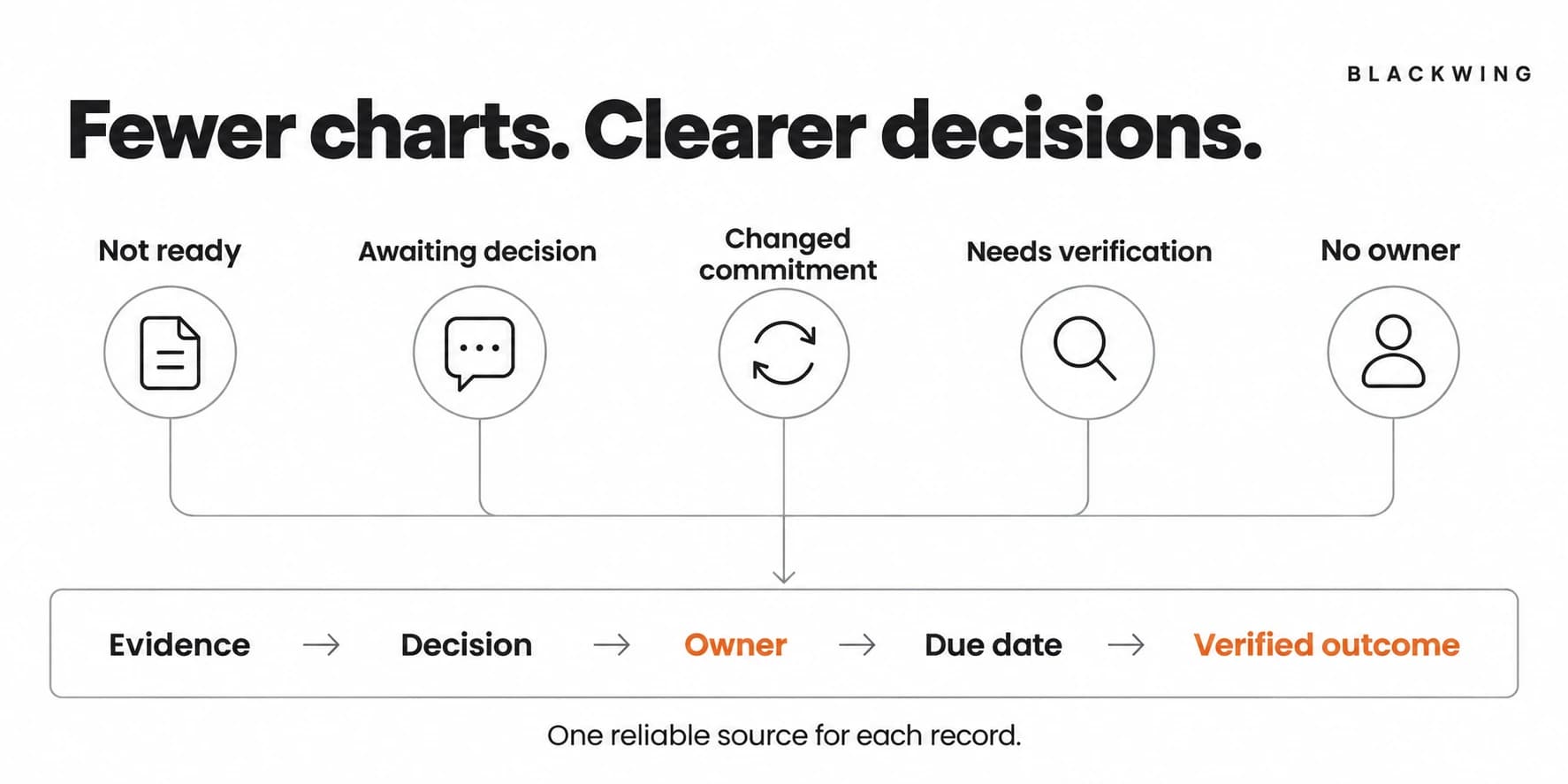
This article proposes an exception-led coordination view. It complements, rather than replaces, a construction job costing process or accounting dashboard.
Ask Five Questions in the Weekly Review
1. Which planned starts are not ready?
Show upcoming work with unresolved prerequisites: crews, equipment, materials, access, required information, or other project-specific conditions.
For each item, identify the missing condition, its owner, next action, and needed-by date. Link to the actual schedule or readiness record. "At risk" without a reason does not help anyone decide.
Do not label safety or technical requirements satisfied merely because the dashboard needs a green status. Use the authorized review outcome.
2. Which decisions are blocking work?
Show RFIs, required reviews, scope questions, and internal decisions that affect the upcoming plan. Identify the respondent, submission date, actual status, and next escalation route.
Keep requested response dates separate from confirmed commitments. Use the RFI workflow to distinguish an unanswered question from an answer still waiting to reach the field.
3. Which commitments have changed?
Surface changed delivery dates, revised allocations, incomplete supplier confirmations, and other commitments the plan relies on. Record the original expectation, latest confirmed state, affected activity, and decision owner.
This is not a competition to collect the most updates. It is a way to identify what the team must reconsider before it repeats last week's plan.
4. Which completed tasks still need verification?
Show work reported complete but still awaiting the required check, including relevant punch items or handover records. The dashboard should not convert a supplier or trade's completion claim into verified closure.
Distinguish a coordination check from specialist acceptance. Both can be visible, but they should not be collapsed into one informal approval.
5. Which actions are waiting without an owner?
Include overdue decisions, unresolved exceptions, and stale records. Define staleness relative to the agreed update cadence for that record, not a random universal number.
An item without an owner is not merely late. It has no reliable route forward. The review should assign the right responsibility or escalate it, not leave it in the same list for another week.
A Dashboard That Leads to Decisions
| Weekly question | Minimum fields | Decision supported |
|---|---|---|
| What is not ready? | Activity, missing condition, owner, needed-by | Replan or resolve prerequisite |
| What is awaiting a decision? | Question, respondent, impact, next action | Follow up through the agreed route |
| What changed? | Commitment, latest evidence, affected work | Reconfirm the plan |
| What needs verification? | Reported outcome, reviewer, evidence | Arrange the required check |
| What is unowned or stale? | Record owner, last update, next action | Restore accountability or escalate |
Keep links to source records. A dashboard summary should not become a second, contradictory project system.
Define Every Measure Before Displaying It
If you track "blocked starts," define which activities count, what constitutes a blocker, the reporting window, and where the data comes from. If you track response age, say whether you mean calendar time since submission or another agreed measure.
Assign an update owner and a last-updated timestamp. A metric based on incomplete field reporting should be labeled incomplete rather than shown as a precise result.
Do not calculate percentages unless the denominator is reliable. A dashboard saying "95% ready" can be misleading when the missing five percent includes the one condition that prevents the job from starting.
An Illustrative Green-Dashboard Problem
Imagine a contractor managing four active jobs. Each project manager updates a general status field to green because no major completion milestone has been missed. One job has an unconfirmed delivery and another has an unanswered clarification affecting next week's work.
The weekly exception view exposes both records. The team assigns a supplier-confirmation action and a clarification follow-up, then decides whether the upcoming plan remains realistic.
The new dashboard has fewer charts. It produces more specific decisions. This example is illustrative, not a measured claim about productivity or profit.
Run the Meeting From the Exceptions
Ask record owners to update the source before the review. During the meeting, focus on exceptions, decisions, and cross-job conflicts rather than asking everyone to narrate all recent activity.
Record each decision, action owner, due date, and completion condition. At the next review, check the actual outcome rather than accepting "followed up" as completion.
Keep urgent issues on their required immediate route. A weekly meeting is not a reason to delay safety concerns, critical project notices, or decisions needed earlier.
Build the View Around Your Actual Workflow
The dashboard can sit in monday.com, ClickUp, a construction platform, or a spreadsheet. Start by agreeing where each source record lives and which fields have one accountable owner.
A tool migration will not fix undefined metrics or stale updates. Process mapping helps identify the handoffs and records the dashboard should reflect.
Conclusion: A Useful Dashboard Changes the Next Action
A construction operations dashboard is valuable when it helps the team see what is blocked, what changed, what needs verification, and who acts next. Build the smallest reliable view that supports those decisions.
Blackwing helps construction businesses connect operating reviews, accountability, and system design. Book an operations review if your reports look polished but the owner still has to discover every problem by phone.
Frequently Asked Questions
What should a small contractor's operations dashboard show?
Show upcoming starts with unresolved conditions, decisions blocking work, changed commitments, tasks awaiting verification, and unowned or stale actions. Include source links, named owners, and next actions rather than only overall project colors.
Which construction KPIs should we start with?
Start with measures linked to decisions your team actually makes and data it can maintain reliably. Define the calculation, reporting period, source, owner, and action triggered. Do not adopt benchmark targets without relevant evidence.
How often should the dashboard be updated?
Set the update cadence according to the record's use and the timing of decisions. Prepare a current view for the weekly review, but route urgent changes immediately. A weekly cadence is not suitable for every project issue.
Is an operations dashboard the same as a job costing dashboard?
No. An operations dashboard focuses on work readiness, coordination, decisions, and follow-through. A job costing dashboard focuses on project cost and margin visibility. They can link to one another while retaining their distinct sources and controls.